Account
Manage your profile, email, password, two-factor options, and personal security history.
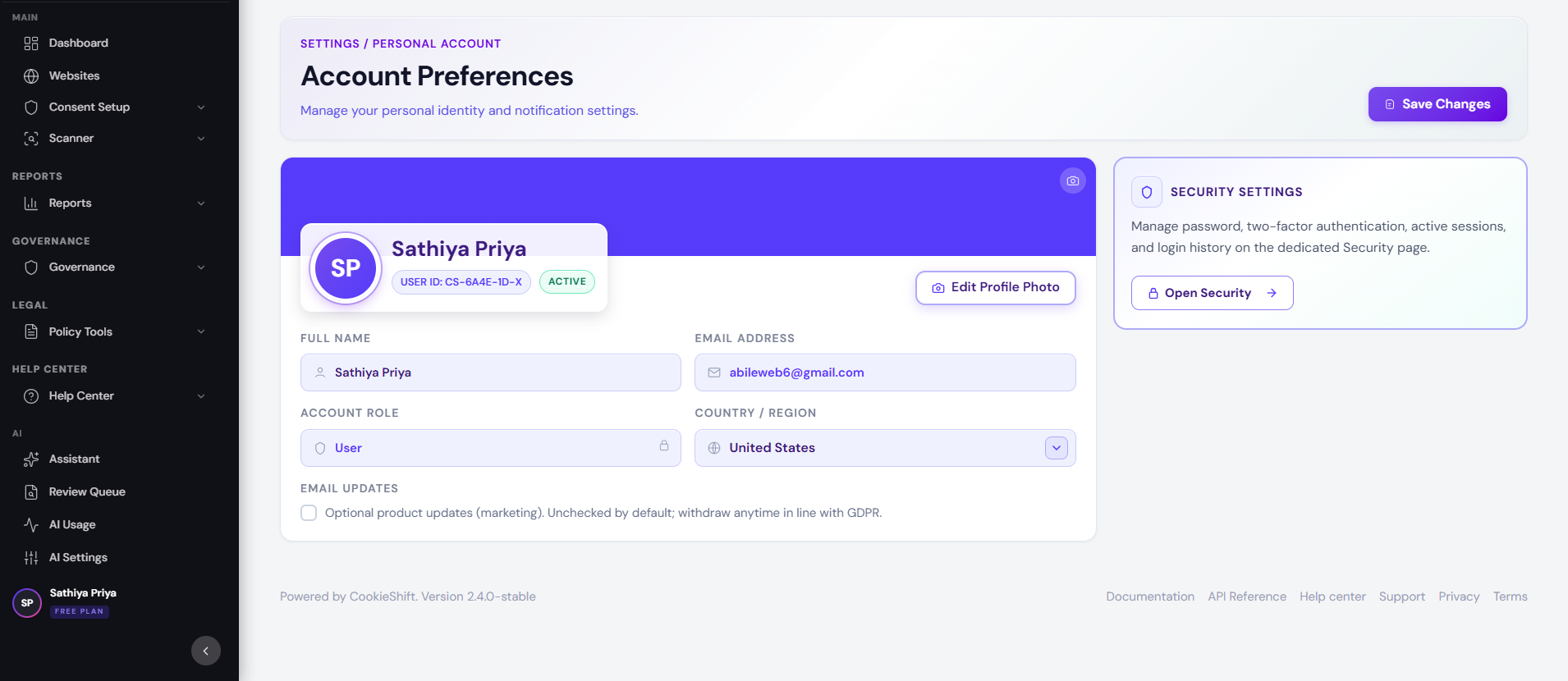
Open Account from the profile menu in the top bar (avatar) to manage your personal user—not the website properties themselves.
Profile information
Update:
- Display name — shown in the sidebar and team views
- Profile photo — upload an avatar image
- Country — used for account metadata and defaults where applicable
Click Save after edits.
Email address
Your sign-in email displays on the profile card. Change email may be rolling out—if unavailable, contact support to update an address tied to billing.
Password and sign-in methods
| Method | Behavior |
|---|---|
| Email + password | Set or change password from the Security section |
| Password changes are managed in Google; link shown as read-only |
OIDC enterprise sign-in is configured through sales-assisted onboarding, not in the self-serve dashboard. Contact sales to connect Google Workspace, Microsoft Entra, or a generic OIDC provider.
Use Security (#security anchor) for password updates and optional two-factor authentication when enabled.
Workspace role
Your role label (for example Workspace Owner, Administrator, Editor) reflects permissions inside CookieShift. Roles determine whether you can manage billing, AI keys, or destructive actions.
Access log
Review recent sign-in and security events:
- Event type (login, password change, etc.)
- Timestamp
- Device or user-agent snippet when available
Paginate through older entries for investigations.
Sign out everywhere
Sign out from the current browser via Settings or the profile menu. To reduce risk on a shared device, sign out and clear browser data. Full session revocation across all devices is managed via password change (email users) when enabled on your deployment.
Delete account vs delete workspace
- Account changes affect your user login.
- Workspace termination under Settings removes the entire organization and all properties.
Confirm which action you need before proceeding.