Consent Setup
Complete guide to the Consent Setup editor—Appearance, Content, Compliance, Integrations, AI, and live preview.
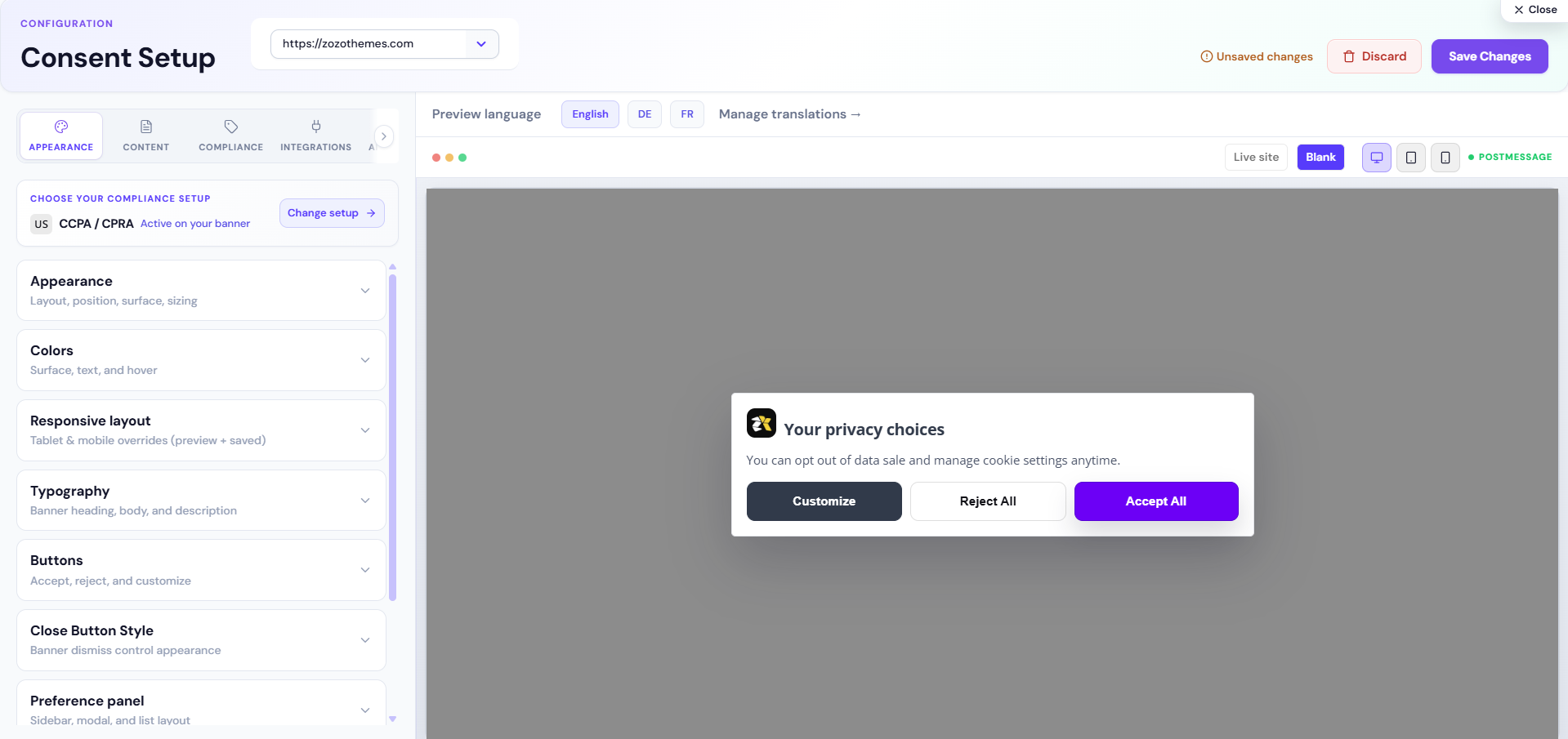
Overview
Consent Setup is where you design the cookie banner visitors see on your website. Use the left panels to change layout, colors, text, and legal settings. The right side shows a live preview before you publish.
After you click Save Changes, CookieShift updates the banner for that website. You do not need to edit code for normal design or copy changes.
When to use it
- First-time banner setup for a new website
- Changing brand colors, logo, or button labels
- Switching between GDPR, CCPA, or another compliance setup
- Updating category descriptions in the preference center
Setup
- Select your website in the header.
- Install CookieShift from Modules (Installation).
- Run a Scanner crawl so category and issue data stay accurate.
- Open Consent Setup.
- Set Compliance (law, buttons, geo) before styling.
- Fill Content for every visible cookie category.
- Click Save Changes, then check your live site in a private window.
| Check | Why |
|---|---|
| Correct property in header | Saves apply to one domain only |
| Script installed | Live site matches preview |
| Latest scan completed | Issue count and AI tools stay accurate |
Examples
| Scenario | Steps |
|---|---|
| GDPR opt-in launch | GDPR law → Strict mode → Accept + Reject + Customize → full Content → Save → EU VPN test |
| Geo-targeted banners | Geo → law rules (EU → GDPR, US → CCPA) → enable geo targeting → test per region |
| A/B banner test | Enable A/B in Compliance → pick variants → Save → compare rates in analytics |
| Integrations | Enable GCM, ACM, or cross-domain under Integrations tab → follow linked guides |
Troubleshooting
| Mistake | Consequence | Fix |
|---|---|---|
| Save on wrong property | Wrong site updates | Check header selector |
| Marketing in Necessary | Compliance issues | Reclassify in Scanner |
| No Reject on GDPR | Regulatory concern | Add Reject button layout |
| Empty category HTML | Scanner flags | Complete Content tab |
| Skip mobile preview | Layout breaks | Use mobile preview frame |
| Banner on site differs from preview | Stale cache or wrong siteId | Hard refresh; confirm embed snippet |
Does Consent Setup change my embed snippet?
No—the snippet from Modules stays the same; config is fetched by siteId.
Best practices
- Set compliance and geo rules before colors and copy.
- Human-review all legal strings; use Translations with counsel for non-English locales.
- Re-test integrations after every publish (GCM, HubSpot).
- Document category → tag mapping for marketing and audit teams.
Editor reference
Before you edit
| Check | Why |
|---|---|
| Correct property in header | Saves apply to one domain only |
| Script installed (Modules) | Live site matches preview |
| Latest scan completed | Issue count and AI tools stay accurate |
Header shortcuts: Discard (revert draft), Save Changes, View report → Compliance, property dropdown, last scan / issue count.
Editor tabs overview
| Tab | Purpose |
|---|---|
| Appearance | Layout, colors, buttons, preference panel chrome |
| Content | All visitor-visible text and per-category HTML |
| Compliance | Laws, geo rules, strictness, timing, A/B tests |
| Integrations | Analytics / tag platform toggles |
| AI Assistant | Generate copy, compliance hints, UX and color ideas |
Keyboard shortcuts 1–5 switch tabs when focus is not in a text field.
Live preview
| Control | Behavior |
|---|---|
| Desktop / Tablet / Mobile | Changes preview frame size |
| Preview banner | Scrolls preview to banner layer |
| Trust footer | Notes preview uses production banner runtime |
Preview updates from your draft before save—visitors see changes only after Save Changes.
Appearance tab — full reference
Banner display & position
| Option | Values | Effect |
|---|---|---|
| Banner display | Bar, Modal, Floating card | Overall shape |
| Banner position | Top/bottom (bar); corners (floating) | Screen placement |
| Preferences panel behavior | Sidebar, Popup modal, Inline expand | How “Customize” opens |
| Dark surface | On/Off | Dark shell styling |
| Overlay | On/Off | Dim background (modal) |
Quick presets (top of Appearance):
| Preset | Description |
|---|---|
| Bar (full width) | Edge-to-edge strip (Cookiebot-style) |
| Floating card | Compact corner panel |
| Modal | Centered dialog |
Layout presets: Simple, Standard, Detailed — control information density.
Button layouts: Accept only · Accept + Reject · Accept + Customize
Colors & dimensions
| Option | Effect |
|---|---|
| Background / body text / body hover | Main banner colors |
| Container width | Min 280px typical |
| Content padding | Inner spacing |
| Preference sidebar width | Sidebar panel width |
| Modal max width / max height (vh) | Modal and drawer bounds |
| Cookie list layout | Stacked cards vs table (dense) |
| Provider card spacing | Gap in preference list |
| Overlay opacity / backdrop blur | Modal backdrop |
| Banner shadow | Default / Soft / None |
| Banner corner radius | Optional px; empty = auto |
Preference center typography
| Option | Effect |
|---|---|
| Heading / body / description size (px) | Text scale inside preferences |
| Sticky preference footer | Keeps action bar visible while scrolling |
Buttons styling
Per Accept, Reject, Customize:
- Background, text, border, hover colors
- Size: Small, Medium, Large (
BANNER_BUTTON_SIZE_OPTIONS)
Compliance badge
| Option | Effect |
|---|---|
| Show badge | Toggle chip on banner |
| Badge text | Label (e.g. “Privacy”) |
| Position | top-left, top-right, bottom-left, bottom-right |
| Colors / radius | Badge chrome |
Brand logo
Upload logo image displayed on banner (file upload).
Content tab — full reference
Main banner copy
| Field | Used on |
|---|---|
| Title | Banner headline |
| Description | Main body HTML/text |
| Accept / Reject / Customize text | Primary buttons |
Panel & action labels
| Field | Typical use |
|---|---|
| Save preferences | Preference center confirm |
| Back / Close | Navigation |
| Manage preferences | Secondary entry |
| Later | Snooze (if enabled in config) |
| Do not sell | CCPA link text |
| Always active | Necessary category hint |
Legal & extended copy
HTML block for extended disclosure in preference flow.
Per-category blocks
For Necessary, Preferences, Analytics, Marketing, Unclassified:
| Field | Purpose |
|---|---|
| Title | Category name in UI |
| Description | Visitor explanation (HTML) |
| Legal description | Extended/helper text |
See Cookie Categories.
Compliance tab — full reference
Law selection
| Control | Behavior |
|---|---|
| Auto-detect from domain | Suggests law from hostname |
| Recommended law hero | One-click apply recommended setup |
| Law registry search | Find regulation by name; Apply |
| GDPR / CCPA / LGPD / Auto via AI | Quick law chips |
Geo → law rules
| Action | Effect |
|---|---|
| Add rule | Map region/country → law id |
| Remove rule | Delete row |
| Hints | Optional mapping guidance in UI |
Visitors receive the law template matching their geo when detection is enabled.
Customize further (accordion)
Advanced security and behavior:
| Option | Effect |
|---|---|
| Strict mode | Prior consent for non-essential where enforced |
| Do not sell enabled | CCPA-style control |
| Do Not Sell placement | Inline / below / preferences only |
| Do Not Track (DNT) | Off / telemetry only / auto reject when unset |
| Sandbox mode | Disabled in UI—managed elsewhere |
Experiments & timing
| Option | Effect |
|---|---|
| A/B test | 50/50 split between variant templates |
| Variant A / B template | Template presets per bucket |
| Animation | Fade, slide-up/down/right, scale |
| Show delay (ms) | Delay before banner appears |
| Scroll trigger (px) | Show after scroll depth |
| Consent renewal (days) | Re-prompt after expiry (cmp enforced; default often 180) |
| Re-show frequency (ms) | Optional re-display timing |
| Hide banner on paths | Comma/newline path prefixes to suppress UI |
Geo targeting (banner display)
Toggle whether banner is global or limited to included countries (country list in saved config).
Integrations tab
Toggle metadata for stack integration (not a substitute for tag manager configuration):
| Integration | Purpose |
|---|---|
| Google Analytics | Consent-aware GA signaling where supported |
| Google Tag Manager | GTM integration hooks |
| Facebook Pixel | Meta pixel consent alignment |
Wire actual tags in your site; CookieShift records consent state for integrated runtimes.
AI Assistant tab (in Consent Setup)
| Tool | What it does |
|---|---|
| 1) Generate Banner Text | Tone + region → draft copy; Apply or Discard |
| 2) Improve Compliance | Lists issues/suggestions; Apply on click only |
| 3) Suggest UX improvements | Clarity and layout tips |
| 4) Recommend color/design | Palette suggestions |
Roadmap notice may list features also available under full AI Assistant.
Save, discard, and publish
| Button | Effect |
|---|---|
| Discard | Reverts unsaved draft to last saved server config |
| Save Changes | Persists to property; disabled if no changes or load error |
| Indicator | “Unsaved changes” vs “All changes saved” |
User journeys
How to launch GDPR opt-in banner
- Apply GDPR in Compliance.
- Enable Strict mode.
- Use Accept + Reject + Customize.
- Fill Content for all categories.
- Save → test EU VPN → export compliance report.
How to configure geo-targeted banners
- Add Geo → law rules (EU → GDPR, US → CCPA).
- Enable geo targeting if separating display.
- Save and test with VPN per region.
How to run an A/B banner test
- Enable A/B test in Compliance.
- Pick Variant A and Variant B templates.
- Save (bumps config version; fresh assignment).
- Compare accept/reject/customize rates in analytics when available.
Common mistakes
| Mistake | Consequence | Fix |
|---|---|---|
| Save on wrong property | Wrong site updates | Check header selector |
| Marketing in Necessary | Compliance issues | Reclassify in Scanner |
| No Reject on GDPR | Regulatory concern | Add Reject button layout |
| Empty category HTML | Scanner flags | Complete Content tab |
| Skip preview on mobile | Layout breaks | Use mobile preview frame |
FAQ
Does Consent Setup change my embed snippet?
No—snippet from Modules stays the same; config is fetched by siteId.
Where is legitimate interest configured?
Document in your privacy policy. Category toggles reflect consent models—consult counsel for LI-only processing.
Can I hide the banner on /app routes?
Use Hide banner on paths—ensure non-essential tags do not fire on those routes without another lawful basis.